My Cart: 0 item(s)

Upload Your Private Label Files
- Private Label Design, Mapping & Uploading
Do Not Upload JPG, PNG, TIFF, BMP Files!
Please review carefully ALL design requirements below before uploading.
- Each front and back private label PDF file for use with one of our stock bags, must be mapped individually to our selected coffee products during the upload process.
- If you plan to supply us with your own fully pre-printed bag (e.g. from Roastar) make sure we approve the design BEFORE you have them printed.
- The upload link can be found at the bottom of this page.
- Your labels, or supplied pre-printed private label coffee bags must be reviewed and approved by us for FDA and USDA compliance, before you place your first wholesale private label coffee order.
- Upon final approval, you will be given wholesale login and private label ordering instructions.
Available Private Label Coffee Offerings:
- We recommend selecting from our most popular and proven coffees, which many are exclusive blends, can be seen at the bottom of our home page.
- Availability of specific single origin coffee growers we offer can change. This could require you to change your graphic/print files depending on your content.
- Limited Edition Reserves and Exotics category offerings, plus our Layer Cake Melange, are NOT available for private label packaging.
Creating Your Labels:
Your labels must have specific information to meet FDA requirements and also USDA and Fair Trade Certified for those type of products. See details on the sample graphics and the explanation sections below.
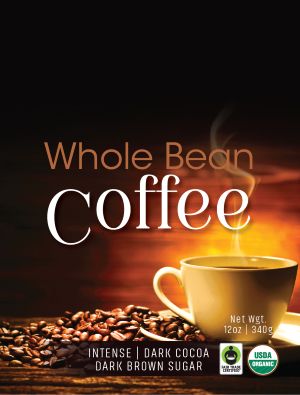
Label Layout Samples
Net Weights
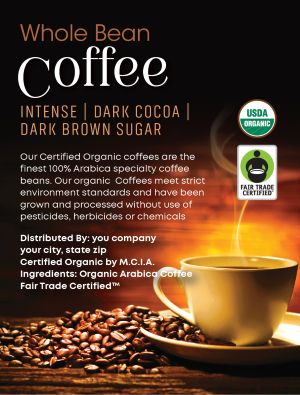
Back Label Sample
Required vertical positioning of the Organic and Fair Trade text statements
Full-Color Labels
We provide high-resolution color labels, printed in-house, on our digital labeling system. We print and apply labels to our stock bags or customer-supplied bags. Your graphic designer must create a complete, finished, edge-to-edge, ready-to-print file for each unique coffee you plan to order. We can dynamically print a BEST if used by date (1 year from roast date) in a specified white area on your label during production runs.
Stock Retail Coffee Bags
The majority of premium coffee brands have switched to flat/block bottom zipper pouches in the last five years. The format signals quality, sustainability, and modern packaging design—important in a competitive specialty coffee market. Consumers and retailers love the format. We offer ten different stock coffee bags for retail packaging.
- Black Flat/Block Bottom Zipper Seal (Strongly Recommended)
- White Flat/Block Bottom Zipper Seal (Strongly Recommended)
- Kraft Flat/Block Bottom Zipper Seal (Strongly Recommended)
- Black Gloss Quad Seal
- Black Matte Side Gusseted
- Gold Gloss Side Gusseted
- Purple Gloss Side Gusseted
- Red Gloss Side Gusseted
- White Gloss Side Gusseted
- White Matte Side Gusseted
Private Label Label File Requirements:
To ensure your private‑label coffee bags print with the highest quality on our Memjet 801 label printing system, please follow these guidelines when supplying label artwork:
1. File Format
- Provide your artwork as a press‑ready PDF.
2. Resolution & Quality
All graphics, logos, and text must be high‑resolution:
300 dpi minimum
Vector artwork strongly recommended
Anti‑aliasing must be ON for smooth edges and clean curves
3. Color Mode
- Submit files in CMYK for the most accurate color reproduction. RGB is accepted but may shift slightly during conversion.
4. Size & Bleed
Your PDF must be sized exactly to the final label dimensions, including:
Front Label: 3” x 4” portrait mode full color (3.125” x 4.125” needed for bleed printing)
Back Label: 3” x 4” portrait mode full color (3.125” x 4.125” needed for bleed printing)
0.125" bleed on all sides if artwork extends to the edge
No crop marks
5. Fonts & Text
- Embed all fonts or convert text to outlines to avoid substitution.
6. Safe Area
- Keep important text/logos at least 0.125" inside the trim area.
7. No Pixel‑Art or Aliased Graphics
- Jagged‑edge artwork will print exactly as supplied. Smooth, anti‑aliased graphics produce the best results on our high‑resolution Memjet 801 printers.
Label File Types:
- Submit only high-resolution PDF separated files.
- Do not submit .ai, .eps, .jpg, .tiff, .png, or .bmp files. They will be rejected.
Mandatory Requirements for Bagged Coffee Labels
- Legal name of Business or Organization
- City, State Zip of Business or Organization
- Web URL and/or Street Address
- Your Own Private Label Coffee Product Names
- Ground or Whole Bean Format
- Ingredients: Arabica Coffee or Organic Arabica Coffee
- Net Weights in both U.S. & Metric measurements
- Date Coding. "BEST if used by" verbaige is now required for any product sales to Californina consumers. If you sell online, we recommend you comply to avoid legal problems. We can apply a small sticker on bottom of bag or dynamically print in a designated white background, including a UPC code if desired, on the back label area during each production run.
- Logo, Taglines/Slogans, Brewing Instructions
- UPC Bar Code/Number (Bar code image must be embedded in label file)
- FNSKU Bar Code/Number (Bar code image must be embedded label file)
- Product Descriptions (Roast Levels; flavors, etc.)
- USDA Certified Organic Logo (on approved products)
- Fair Trade Certified Logo (on approved products)
USDA Certification Requirements:
- Use of the USDA Organic logo or the word “Organic” on your label requires specific wording and vertical text positioning.
- Download USDA Organic Logo Files
Fair Trade Certified
Label Requirements:
- Use of the Fair Trade Certified™ logo, requires the proper text statement, Fair Trade Certified™, placed just below the ingredients statement.
- Download Fair Trade Certiifed Full Label File
USDA Certified Organic and Fair Trade Certified Text Statements:
Text size and font must be easily readable. Each respective logo can be used anywhere on your labels.
Required Vertical Layout & Text:
Manufactured for
Business Name or Distributed by Business Name
City State Zip
(Street is required if no URL is on the package)
Certified Organic by
MCIA
Ingredients: Organic
Arabica Coffee
Fair Trade Certified™
USDA Certified Organic registration is required prior to production for all organic labeled products (usually a 7 to 10-day turnaround), which we coordinate. All organic registration fees are paid by us. Organic label files will be submitted for approval and registration only after your opening order has been prepaid.
Kosher Certified Labeling
- Use of the cRc Kosher Certified logo on packaging requires setup and annual fees. Contact us for details.
Flavored Coffee Labeling
- No flavored coffee is Certified Organic or Fair Trade Certified.
- The ingredients statement for flavored coffee must be: Contains coffee plus natural and/or artificial ingredients.
Product Label File Upload
- Upload each front and back label separately for each coffee product size and format.
- Use this link below to map our coffee product to your product label and upload one PDF label file at a time.
Click Here To Upload Your Files
Please allow 7 to 10 days for our testing. This also
includes any changed label files you submit.
For questions contact us.